安装配置 gitbook 过程中遇到的两个问题及其解决办法
问题1:TypeError: cb.apply is not a function
问题描述
在使用gitbook init安装gitbook过程中一直出现cb.apply is not a function的问题。当前的node版本为16.4.2,配置的镜像为registry = "http://registry.npm.taobao.org/"。错误信息如下所示:
MSI@DESKTOP-T7KBBVI MINGW64 /d/Research/MyBooks
$ node -v
v16.4.2

MSI@DESKTOP-T7KBBVI MINGW64 /d/Research/MyBooks
$ gitbook -V
CLI version: 2.3.2
Installing GitBook 3.2.3
C:\Users\MSI\AppData\Roaming\npm\node_modules\gitbook-cli\node_modules\npm\node_modules\graceful-fs\polyfills.js:287
      if (cb) cb.apply(this, arguments)
                 ^

TypeError: cb.apply is not a function
    at C:\Users\MSI\AppData\Roaming\npm\node_modules\gitbook-cli\node_modules\npm\node_modules\graceful-fs\polyfills.js:287:18
    at FSReqCallback.oncomplete (node:fs:196:5)
解决办法
使用链接https://www.cnblogs.com/cyxroot/p/13754475.html中的解决办法,通过注释掉polyfills.js中的62-64行,然后重新gitbook init即可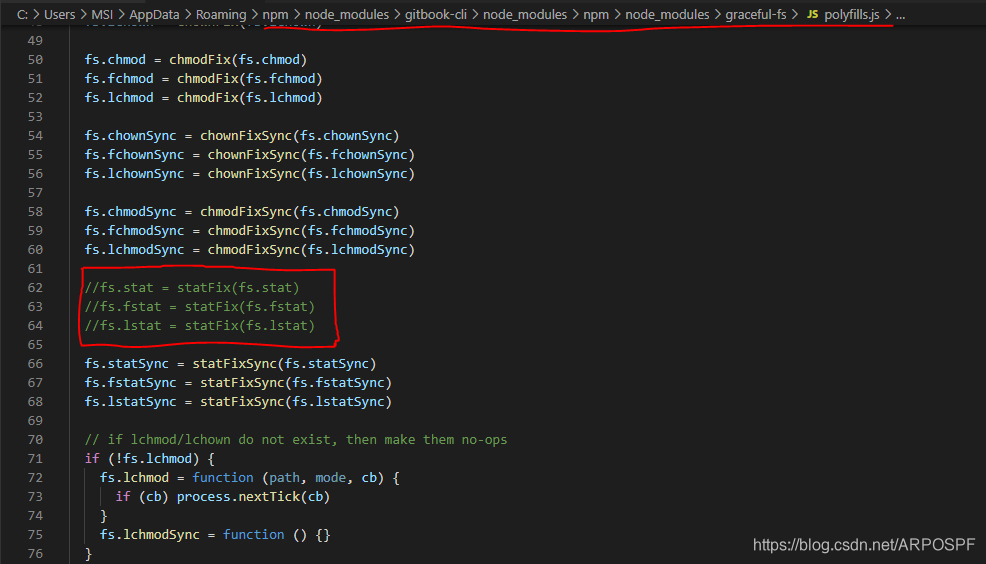
注意,在执行gitbook init过程中可能需要等待较长时间。过程如下:
MSI@DESKTOP-T7KBBVI MINGW64 /d/Research/MyBooks
$ gitbook -V
CLI version: 2.3.2
Installing GitBook 3.2.3


gitbook@3.2.3 C:\Users\MSI\AppData\Local\Temp\tmp-119600OkZ9wU09vs1\node_modules\gitbook
├── escape-string-regexp@1.0.5
├── escape-html@1.0.3
├── destroy@1.0.4
├── ignore@3.1.2
├── bash-color@0.0.4
├── gitbook-plugin-livereload@0.0.1
├── cp@0.2.0
├── graceful-fs@4.1.4
├── nunjucks-do@1.0.0
......
MSI@DESKTOP-T7KBBVI MINGW64 /d/Research/MyBooks
$ gitbook -V
CLI version: 2.3.2
GitBook version: 3.2.3
问题2:TypeError [ERR_INVALID_ARG_TYPE]: The “data” argument must be of type string or an instance of Buffer
问题描述2
安装完成gitbook之后,使用gitbook init进行初始化,目标是生成“README.md”和“SUMMARY.md”,它们的作用如下:
- README.md —— 书籍的介绍写在这个文件里
- SUMMARY.md —— 书籍的目录结构在这里配置
但是,出现了一个错误,导致只生成了一个README.md文件。错误如下:
MSI@DESKTOP-T7KBBVI MINGW64 /d/Research/MyBooks
$ gitbook init
warn: no summary file in this book
info: create README.md
info: create SUMMARY.md

TypeError [ERR_INVALID_ARG_TYPE]: The "data" argument must be of type string or an instance of Buffer, TypedArray, or DataView. Received an instance of Promise
解决办法2
在stackoverflow中看到这样一句话gitbook init creates readme.md and summary.md files, nothing more. If the command fails, you can create SUMMARY.md manually and use gitbook build to build your docs. Anyway, switching to a modern static-site generator is a good idea, as GitBook is heavily outdated (more than 2 years).意思是说:gitboot init创建了readme.md和summary.md文件,没有其他的了。如果命令失败,你可以手动创建SUMMARY.md,并使用gitbook build去构建你的文档。总之,选择一个流行的静态站点生成器是一个好主意,因为GitBook已经严重过时了。
因此,我们手动创建了一个SUMMARY.md文件,并填写如下内容:
// SUMMARY.md

# Summary
* [Introduction](README.md)
* Part I
    * [从命令行进行测试](Chapter1/CommandLine.md)
    * [Monkey](Chapter1/Monkey.md)
    * [monkeyrunner 参考](Chapter1/MonkeyrunnerReference.md)
        * [概览](Chapter1/MonkeyrunnerSummary.md)
        * [MonkeyDevice](Chapter1/MonkeyDevice.md)
        * [MonkeyImage](Chapter1/MonkeyImage.md)
        * [MonkeyRunner](Chapter1/MonkeyRunner.md)
* Part II
    * [Introduction](Chapter2/c1.md)
    * [Introduction](Chapter2/c2.md)
    * [Introduction](Chapter2/c3.md)
* [Introduction](Chapter2/c4.md)然后使用命令gitbook serve ,gitbook 会启动一个 4000 端口用于预览:
MSI@DESKTOP-T7KBBVI MINGW64 /d/Research/MyBooks
$ gitbook serve
Live reload server started on port: 35729
Press CTRL+C to quit ...

info: 7 plugins are installed
info: loading plugin "livereload"... OK
info: loading plugin "highlight"... OK
info: loading plugin "search"... OK
info: loading plugin "lunr"... OK
info: loading plugin "sharing"... OK
info: loading plugin "fontsettings"... OK
info: loading plugin "theme-default"... OK
info: found 1 pages
info: found 0 asset files
info: >> generation finished with success in 0.3s !

Starting server ...
Serving book on http://localhost:4000
效果如下: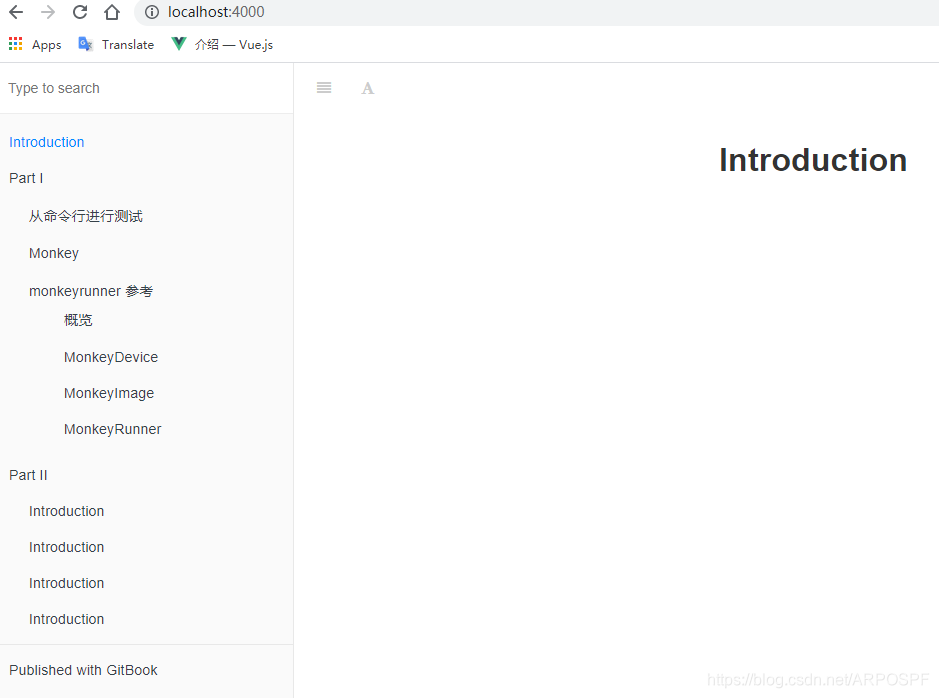
第二种预览方式,运行 gitbook build 命令后会在书籍的文件夹中生成一个 _book 文件夹, 里面的内容即为生成的 html 文件. 我们可以使用下面命令来生成网页而不开启服务器。
MSI@DESKTOP-T7KBBVI MINGW64 /d/Research/MyBooks
$ gitbook build
info: 7 plugins are installed
info: 6 explicitly listed
info: loading plugin "highlight"... OK
info: loading plugin "search"... OK
info: loading plugin "lunr"... OK
info: loading plugin "sharing"... OK
info: loading plugin "fontsettings"... OK
info: loading plugin "theme-default"... OK
info: found 1 pages
info: found 0 asset files
info: >> generation finished with success in 0.2s !
参考资料
- https://stackoverflow.com/questions/61538769/gitbook-init-error-typeerror-err-invalid-arg-type-the-data-argument-must-b
- https://www.jianshu.com/p/e86c702578df
- https://github.com/npm/npx/issues/67
- https://github.com/nodejs/node/issues/34529
- https://github.com/nodejs/help/issues/2874
- https://www.cnblogs.com/shaozhiqi/p/14643803.html
- https://www.cnblogs.com/cyxroot/p/13754475.html